


Virtualized Phone System

A virtual phone system eliminates the need for on-site hardware. Your virtual phone system is hosted by the provider.

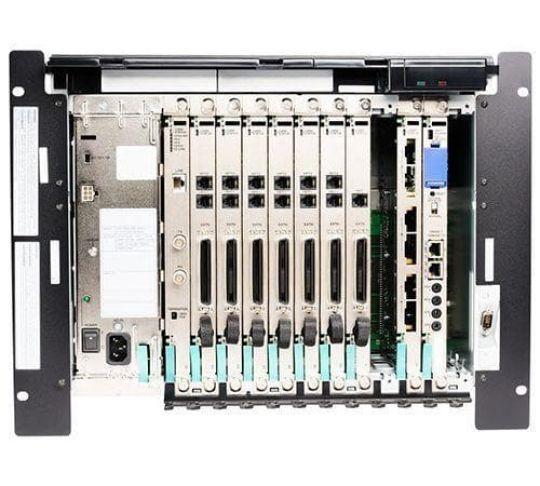
Virtual phone systems use your Internet connection and are especially useful for small businesses. Newer companies like RingCentral and Phone.com use virtualized phone systems instead of PBX (private branch exchange). PBX manages calls internally and connects an organization to the public switched telephone network (the traditional phone network). PBX gives extensions to employees and fax machines. PBX also has a lot of additional features.

Today, many small businesses use a virtualized phone system, known as hosted PBX, that requires much less hardware and installation than hardline systems. Hosted PBX keeps everything with the provider and all functions are digital. Virtual phone systems are thus cost-effective and convenient.

How cost-effective? Traditional PBX systems are thousands of dollars just for the equipment. Hosted PBX costs nothing for equipment because there is none.

Plan Long Dist. Monthly Fees Setup Fees User Rating

Nextiva Office

  • Unlimited calling
  • US-based support
  • No contracts
0¢/min $21.95 $0.00
4.597295

PBX Unlimited Extension

  • Unlimited local and long distance
  • Company Call Record, Voicemail to email transcription
  • No contracts, no setup or installation fees
0¢/min $24.99 $0.00
4.782855

OnSIP Business Phone Service

  • Reliable, affordable, and easily deployable
  • Fortune 500 features at low cost. Perfect for businesses of 20+ employees
  • If you can set up email, you can set up OnSIP. Free 30-day trial.
3¢/min $16.78 $0.00
4.56

Virtual Office

  • Unlimited Calling (US and Canada)
  • Includes a softphone and mobile app
  • No contracts
0¢/min $24.99 $0.00
4.245505

Jive PBX

  • Industry-leading reliability
  • Free Long Distance
  • No Contracts or Hidden Fees
0¢/min $21.95 $0.00
4.82055

RingCentral Office

  • Unlimited Calling and Faxing (US & Canada)
  • No Commitment, No Setup Fees, No Installation
  • Price for 20+ users
0¢/min $24.99 $0.00
4.3

Business VoIP Unlimited

  • Unlimited local and long distance (US & Canada)
  • No contract required
  • Award-winning solution
0¢/min $24.99 $0.00
4.585715

Hosted Cloud PBX

  • Free equipment
  • Unlimited extensions
  • Toll free number included
N/A $29.00
4.8

Class A DLS Hosted PBX

  • Super-powered PBX
  • Ultra-low flat-rate Pricing
  • Use ANY phone
0¢/min $15.00 $0.00
4.88

Virtualized Phone System: Benefits and Features

Virtual phone systems use VoIP (Voice over Internet Protocol) for their exchange. Service providers supply a web interface to easily manage and control professional features.
These features include:

  • call forwarding
  • extensions
  • voicemail
  • directories and address books
  • hold capabilities (music, etc)

Virtual phone systems have many benefits for the office, more than just those listed above. For one, an auto attendant directs callers who would otherwise get a busy signal to a custom message system. Callers can hold, or the system can be set up to send the call to an idle phone. You can hold on to clients this way, literally, until an answer is available.

You can pay for fewer phone lines with a virtual phone system as well because of the easy availability of extensions. Also, with a virtual phone system, you don’t have to pay for extra phone lines to protect for high call volume; the virtualized system is built to handle calls in the event too many people call (with voicemail, hunt groups, call waiting and auto attendant).

Virtual phone systems are owned and maintained by the VoIP provider, saving offices and small businesses time and money. Because customization is virtualized on a web/program interface, configuration is no hassle. Adding or changing features is very easy.

Costs in the Virtual Phone System Industry

Microsoft calls its phone system Microsoft Lync, part of its “Unified Communications Solutions.” Lync uses VoIP, of course. Like most PBX systems, you can choose to run the entire server yourself or have Microsoft host it (that’s the virtual phone system part). That is, starting at $700, at the least, with an annual fee of $7 per user.

Our reviews describe other virtual phone system providers, and cheaper than Microsoft’s PBX.

The money you save depends on the size of your office. For small businesses, a virtual phone system is perfect; not many employees, not many phones. (You will have to purchase VoIP phones, of course.) The standard is about $30 per month per user, which is a good deal for up to maybe 20 people. If you are a mid-size business, you may want to consider setting up your own PBX. IP PBX will reduce costs in the long-run, with more expensive equipment and lower monthly fees since you will only be paying for the VoIP service.

If you want a discount, try asking the service provider. You can also get a discount through our VoIP providers just for being a user of VoIPreview.

Last Updated: 05/23/2012 09:05 PM